Tag

Security

Network Access Control

By Network Security No Comments

What is NAC?

Given the current businesses reliance on tech on a daily basis, many organisations feel the need like to tackle the cyber issue from various angles. Traditional ways are to procure a simple antivirus solution, perimeter firewalls, and use a separate system for managing access permissions. However, with the heavily use of Wi-Fi and mobile devices, the trend has shifted to embrace the NAC, Network Access Control.

What is Network Access Control, NAC?

Network Access Control is the act of keeping unauthorized users and devices out of a private network. Organisations that give certain devices or users from outside of the organization occasional access to the network can use network access control to ensure that these devices meet corporate security compliance regulations.

NAC solutions are designed to help network admin to boost the overall security level for internal users. That would guarantee the right person would get the right permissions with right authentication methods.

What are common use cases for network access control?

If an organization is under any of the following circumstances, they need to think cautiously about network access control to secure the enterprise network:

  • Bring Your Own Device (BYOD):
  • Any organization that allows employees to use their own devices to connect to the corporate network or take the corporate devices home should think about when those devices connect back to the company sensitive network. Each device could be or create a vulnerability that which will encourage the cyber criminal to bypass the traditional security controls.

  • Network access for non-employees:
  • Some organizations need to grant access to people or devices that are outside of the organization with many reasons, like conferences, contractors or visitors. But, those access with different purposes should not be subject to the same security controls. Especially for contractors, they might need the access to the corporate network from time to time, and you will not want to grant the same level of access which you employees have for a short time project. That should be under the monitor and with proper level of authentication.

  • Network access without Port Security:
  • Traditional network access will require the end users to connect to the floor switched to gain the access to the network. But, some of the access are not under port security policies. That means anyone can access the network when they plug into the same port without necessary authentication to fake the employee permissions. For those ports which are exposed and hard to manage as constant changes happened, it is necessary to use NAC to grant the right authorization to the person no matter where they connect.

  • IoT devices:
  • The Internet of Things, as known as IoT, has given rise to a proliferation of devices that may fly under the radar of traditional security controls. They could locate outside of your physical buildings, but they still be able to connect to your network through some forms of transmission media. As a non-standardized industry, Cyber criminals can easily exploit these overlooked devices to find their own ways into your network without getting any kinds of permissions. Network access controls plays a important role in your edge security.

    Make your network intelligent against threats with Sprint Networks. We aim to secure Australian businesses and institutions from all malicious activities that can take advantage of network vulnerabilities.

    If you think you are at risk!

    If you have questions, please drop us an e-mail at info@sprintnetworks.com

    Cyber Threat Intelligence

    By Network Security, Superfast IT Networks No Comments

    What should be expected from your threat intelligence?

    Threat intelligence has been widely used right now, and it plays a crucial role in your security posture. If you are a cybersecurity professional, you must be familiar with the concept even though you might not fully understand how it works. It could be much more important to your various domains of cybersecurity, especially for those who are dealing with Security Information and Event Management tools or work within the incident response teams.

    But, what you should be expecting when using a threat intelligence feed, especially when they need to collaborate with other security elements, such as NGFW, Email Services, WAF. Sprint Networks is partner with the leading security threat intelligence provider, Fortinet. What you should be expecting from the threat intelligence:

    1. Antivirus:

    Threat intelligence should deliver automated updates that protect against the latest viruses, spyware, and other content-level threats. It uses industry-leading advanced detection engines to prevent both new and evolving threats from gaining a foothold inside your network and accessing its invaluable content.

    2. Intrusion Prevention (IPS):

    Threat intelligence automated IPS updates provide latest defenses against network intrusions by detecting and blocking threats before they reach your network devices. You get the latest defenses against stealthy network-level threat, a comprehensive IPS Library with thousands of signatures, flexible policies that enable full control of attack detection methods to suit complex security applications, resistance to evasion techniques proved by NSS Labs and IPS signature lookup service.

    3. Application Control:

    Improve security and meet compliance with easy enforcement of your acceptable use policy through unmatched, real-time visibility into the applications your users are running. With FortiGuard Application Control, you can quickly create policies to allow, deny, or restrict access to applications or entire categories of applications. The sophisticated detection signatures identify Apps, DB applications, web applications and protocols; both blacklist and white list approaches can allow or deny traffic. Traffic shaping can be used to prioritize applications and flexible policies enable full control of attack detection methods.
    Application Control

    4. Security Rating Service:

    The Security Rating Service is helps guide customers to design, implement and continually maintain the target Security Fabric security posture suited for their organization. By running Security Rating Service audit checks, security teams will be able to identify critical vulnerabilities and configuration weaknesses in their Security Fabric setup, and implement best practice recommendations.

    5. IoT Service:

    The IoT service helps customers significantly reduce their attack surface by enabling the Fortinet Security Fabric to automatically discover and segment IoT devices based on FortiGuard intelligence, and enforce appropriate policies against them. With the service, FortiGates can query FortiGuard servers to obtain information about unknown devices and then act accordingly based on policy
    iot

    6. Indicators of Compromise (IOC) :

    The IOC service is an automated breach defense system that continuously monitors your network for attacks, vulnerabilities, and persistent threats. It provides protection against legitimate threats, guarding customer data and defending against fraudulent access, malware, and breaches. It also helps businesses detect and prevent fraud from compromised devices or accounts

    7. Vulnerability Scan

    Vulnerability scan network assets for security weaknesses, with on demand or scheduled scans. Comprehensive reports on the security to benefit from and access the intelligence, expertise, and protection delivered by FortiGuard Labs, customers simply need to add the desired security subscriptions to their Fortinet Security Fabric deployment. FortiGuard security services are designed to optimize performance and maximize protection across the Fortinet Security Fabric and are available as both individual and bundled subscriptions. Our subscriptions cover every aspect of the attack surface and includes IP reputation updates, intrusion prevention, web filtering, antivirus/anti-spyware, anti-spam, database security, virus outbreak protection service, content disarm & reconstruction, security rating services and network and web application control capabilities. Subscribe to FortiGuard to stay protected against the latest threat across all threat vectors and attack surfaces today! DATA SHEET | Fortinet Transceivers 3 FortiGuard Subscription Bundles posture of your critical assets and automated scanning of remote location FortiGates.

    8. Web Application Firewall (WAF):

    Automated WAF signature updates that protect against SQL injection, cross-site scripting, and various other attacks, hundreds of vulnerability scan signatures, data-type and web robot patterns, and suspicious URLs. Supports PCI DSS compliance by protecting against OWASP top 10 vulnerabilities and using WAF technology to block attacks.

    9. Web Filtering:

    Block and monitor web activities to assist customers with government regulations and enforcement of corporate internet usage policies. FortiGuard’s massive web content rating databases power one of the industry’s most accurate web filtering services. Granular blocking and filtering provide web categories to allow, log, or block. Comprehensive URL database provides rapid and comprehensive protection. And, Credential Stuffing Defense identifies login attempts using credentials that have been compromised using an always up-to-date feed of stolen credentials.

    10. Industrial Control Systems Security:

    The FortiGuard Industrial Security Service continuously updates signatures to identify and police most of the common ICS/SCADA (supervisory control and data acquisition) protocols for granular visibility and control. Additional vulnerability protection is provided for applications and devices from the major ICS manufacturers.
    control System

    11. Antispam:

    FortiGuard Antispam provides a comprehensive and multi-layered approach to detect and filter spam processed by organizations. Dualpass detection technology can dramatically reduce spam volume at the perimeter, giving you unmatched control of email attacks and infections. Advanced anti-spam detection capabilities provide greater protection than standard real-time blacklists.

    12. Cloud Sandbox:

    FortiCloud Sandbox Service is an advanced threat detection solution that performs dynamic analysis to identify previously unknown malware. Actionable intelligence generated by FortiCloud Sandbox is fed back into preventive controls within your network—disarming the threat. FortiSandbox is NSS Labs Recommended for breach detection and breach prevention, and ICSA Labs certified for advanced threat defense.

    Make your network intelligent against threats with Sprint Networks. We aim to secure Australian businesses and institutions from all malicious activities that can take advantage of network vulnerabilities.

    If you think you are at risk!

    If you have questions, please drop us an e-mail at info@sprintnetworks.com

    Taking Action To Protect Your Infrastructure Against Cyber-Attack

    By Network Security No Comments

    Copy-Paste Compromise

    In this month, Australia Cyber Security Center has announced the statement on malicious cyber activity against Australian institutions, including hospitals and state-owned utilities.

    The attacker has been identified leveraging a number of POC, proof-of-concept, exploit code, shells, and other various tools from open source. These actions are primarily through the use of remote code execution vulnerabilities in unpatched versions of Telerik UI and other Microsoft IIS and Citrix vulnerabilities.

    The attacker has shown the capability to find and quickly leverage exploitable public vulnerabilities and regularly conducts reconnaissance of target networks looking for vulnerable services. The attacker might potentially maintain a list of public-facing services to quickly locating the vulnerable services after future vulnerability releases.
    Malware

    How Is The Attack Happening

    The attacker has shown the capability to find and quickly leverage exploitable public vulnerabilities and regularly conducts reconnaissance of target networks looking for vulnerable services. The attacker might potentially maintain a list of public-facing services to quickly locating the vulnerable services after future vulnerability releases.
    If your company does not host any public-facing services, it does not mean your network would be one of the victims in this action. The ACSC has identified that the attack is also utilising various phishing techniques. The ACSC has advised the phishing has taken the form of:
    • links to credential harvesting websites
    • emails with links to malicious files, or with the malicious file directly attached
    • links prompting users to grant Office 365 OAuth tokens to the actor
    • use of email tracking services to identify the email opening and lure click-through events.

    Sprint Networks Solution

    Sprint Networks has an experienced team with comprehensive solutions to support your evolving security requirements. We have a strong partnership with leading technology providers to secure and maintain your security today and into the future.

    Sprint Networks is offering Managed Email and DNS Security to strengthen your security defences with better control over all aspects of inbound, outbound emails, and suspicious traffic. To avoid becoming a victim in this attack, relying on people to keep your business safe should not be part of your options.

    We are providing cloud -based Email Security solution filters all malicious email before it even hits your network components. Even though your employment received the malformed web address from other sources, we will block the requests before it even sends out from your network. The attacker will not be able to get any responses from the victims.

    Protect your business from Cyber Threats with Sprint Networks. We aim to secure Australian businesses and institutions from all malicious activities that can take advantage of network vulnerabilities.

    If you think you are at risk!

    If you have questions, please drop us an e-mail at info@sprintnetworks.com

    Firewall: Traditional Vs Next Generation

    By Featured, Network Security No Comments

    Next-Gen Firewall (NGFW) vs. Traditional Firewall

    The purpose of any enterprise-grade firewall is to protect your network, internal systems and confidential data against intruders and malicious access.
    They all share the same basic goal, but specific technologies, features, capabilities and level of complexity could vary immensely.
    The two most basic categories for enterprise-level firewalls are traditional and next-generation. NGFW, Next-generation firewall, are the more advanced of the two types. It would offer the most robust protection for your business.
    But what would be the differences between the Nest-Generation firewall and traditional firewall, how do the differences can benefit your business?

    Traditional Firewall

    Traditional firewalls are designed to police the traffic. The traffic in and out of a network will be controlled based on source IP address, destination IP address, port, and protocol.
    When we talk about the traditional firewall, we are talking about the traditional stateful firewall. The features of the traditional firewall are limited, such as:

    Stateful inspection, traffic is defined as flow instead of isolated packets. Rules can be applied to the traffic flow, and decisions can be made on the behaviours.
    Virtual Private Network provides a secured entry for the network when users or systems traverse the public or untrusted network.
    Packet filtering helps the network administrator to ensure both ingress and egress traffic is under inspection. Firewalls can terminate the connection initialed by suspicious source on behalf of users.

    Next-Generation Firewall

    A next-generation firewall does this and so much more. In addition to access control it provides more granularly rules to block modern threats. According to Gartner’s definition, a next generation firewall must have:
    • Standard firewall capabilities like stateful inspection
    • Integrated intrusion prevention
    • Application awareness and control to see and block risky apps
    • Threat intelligence sources
    • Upgrade paths to include future information feeds
    • Techniques to address evolving security threats
    The next-generation firewalls should deliver 4 core benefits to your organization:
    Application awareness empowers the organization to set specific rules for each application instead of IP and port number. The definition of each application is the core function of NGFW. Traditional applications are defined by port number which can be used by everyone. It is critical to use App-ID to identify traffic flow, and detect evolving threats.
    Intrusion prevention system has the capability to actively detect and block intrusions. The detection would refer to the cloud database, which is dynamically updated against zero-day attack
    Threat Intelligence provides the firewall and other security appliance with the latest intelligence to detect and stop emerging threats.
    Deep packet inspection (DPI) ensures a thorough inspection of the packet’s contents, whereas standard packet inspection only reads the header. NGFW would look after the full context of every single packet.

    Don't Leave Vulnerability In Your Network By Outdated Security Technology

    Modern businesses need modern protection. The cyber threat landscape is forever expanding along with innovations in technology, which unfortunately means that cyber criminals are far from finished. If anything, their job is getting easier.

    Sprint Networks provides managed NGFW service, providing multiple levels of security for your network.
    As a managed security service, we take the responsibility away from your resource, empower your staff to concentrate on what you do best.

    Find out more about NGFW service at info@sprintnetworks.com

    DNS Security

    By Network Security No Comments

    Why is DNS security critical?

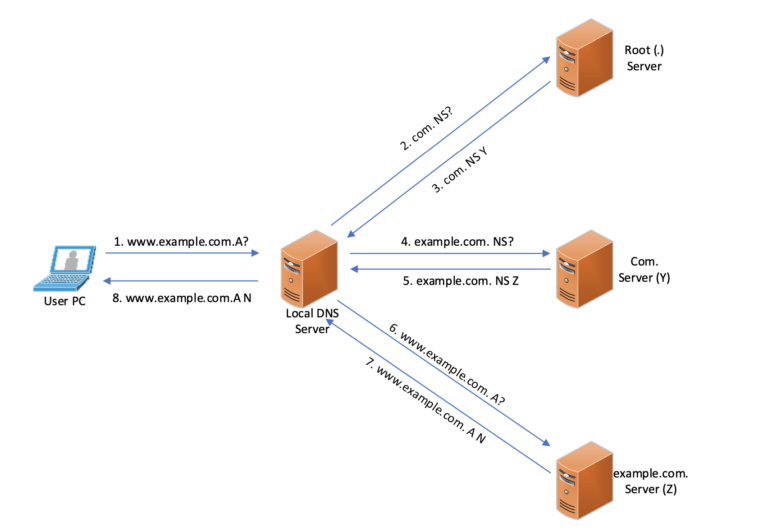
    From a network security perspective, Domain Name System is one of the most widely used network protocols across the Internet.
    DNS is an open protocol used in 99% of internet connection. Unfortunately, it is packaged into a UDP 53 packet with plain text naturally. The open nature has made DNS become a leading pathway for ransomware and other security risks.
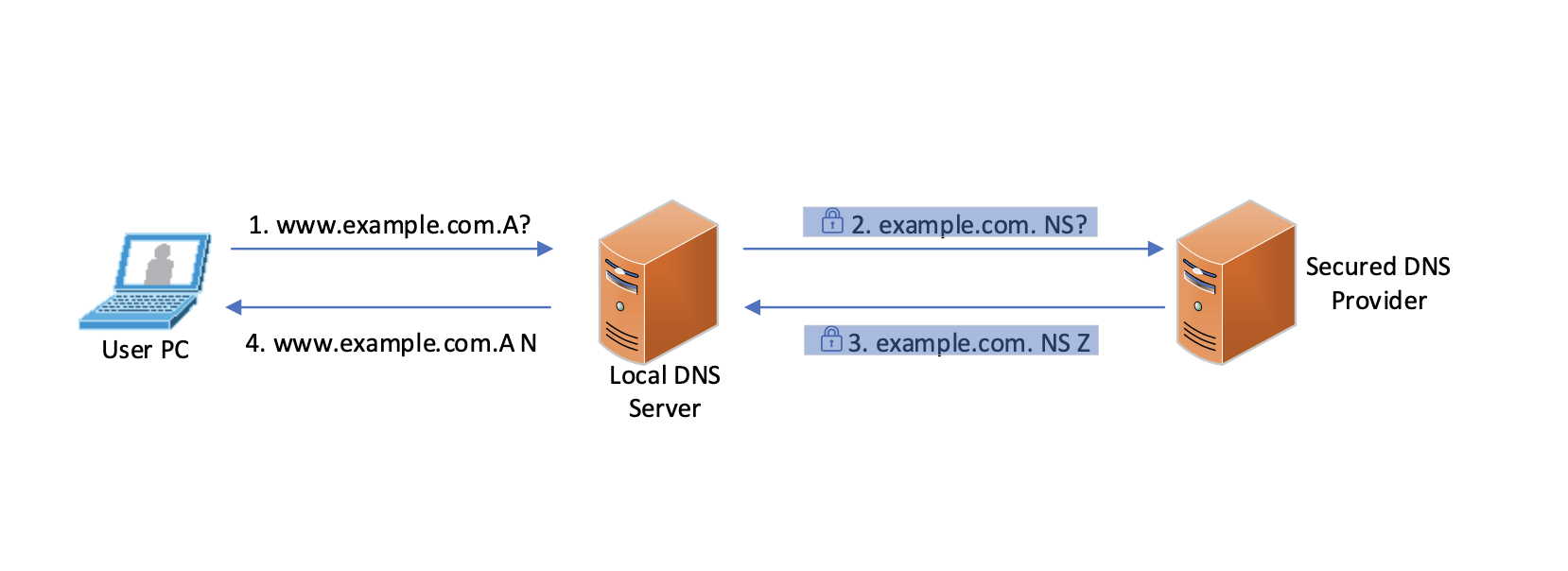
    Now, the new DNS privacy standard is DNS over TLS, DoT. TLS, Transport Layer Security, helps the new standard to address what is the ‘last mile’ problem for DNS security. The communication between DNS client, your local DNS server or your PC, and your DNS provider, mostly would be Google, are almost always unencrypted and, therefore, subject to hijacking and other threats. DoT not only strengthens the DNS security by encrypting but also authenticating the DNS server with a digital signature.
    The usual way of blocking threat is to use enterprise threat protecting mechanism against every daily threat. The most effective way to improve your security stack is to protect your network at the start point.

    Trade-offs of using DoT

    In the real case, the new DNS protocol makes it more difficult to be used for immoral purposes. But, it will make it challenging to get the internal security mechanism to work as well. However, enterprises always want to maintain internal security control over their DNS server. For those use cases, the new protocols come with notable security trade-offs

    • Bypassing enterprise controls: Although DoT provides the solution to gain the DNS level security by encrypting the DNS requests and response, it might unconsciously bypass enterprise contents control.
    • DNS server performance reduction: traditional DNS depends on UDP, User Datagram Protocol, and it is unreliable but more efficient. DNS over TLS will run over the TCP, Transmission Control Protocol, which needs more resources on your local DNS server. Apart from that, using TLS requires your DNS server to encrypt queries and decrypt responses, and the size of DNS packets will also increase accordingly. Adding more resources needs to be put into consideration if the same performance is required.
    • Education for end-users: DoT is in constant development, bringing challenges to the existing infrastructure. All managers and architects, whether they are running infrastructures on public cloud or private networks, should be aware of the evolution.

    Best Practice

    • Choosing a reliable DNS provider, who will guarantee 100% uptime and using technology like anycast to perform resiliently.
    • Starting Looking after your security concern. Your DNS server should proactively respond to threats. You should be able to use the Internet’s infrastructure to block malicious and unwanted domains, IP addresses, and cloud applications before a connection is ever established.
    • Blocking direct DNS requests is a good place to start. Between the internal users and DNS providers on the Internet, there should be another step in the middle, like local DNS infrastructure. It would allow the administrator to comprehensively apply DNS policy without getting end-users involved.
    • Making sure all queries are accountable. Your administrator is capable of seeing logs for all DNS activity to simplify investigation. The logs will also be the reference for security decisions.

    Traditional Way of DNS Resolution

    DNS Resolution

    DNS Resolution Process with Secured DNS Provider

    DNS Security
    More details on DNS security privacy and DNS security provider are available in the Managed DNS security solution. Stop blindly trust every websites without, start using Advanced Threat Intelligence to secure your DNS infrastructure. More security solutions are available on Managed Service Center. Start looking after your network security with right partner. If you’re interested to learn how more about DNS Security, contact us today at info@sprintnetworks.com