
Cybersecurity for PNG businesses is about keeping your email, money, systems and customer data safe, so one stolen password or one fake invoice does not stop your business. This guide covers the threats PNG businesses face today, six essential checks you can start with this week, and when it makes sense to bring in a managed cybersecurity partner.
It is based on what Sprint Networks sees every day working with businesses and their IT teams across Port Moresby, Lae and the wider Pacific.
Why cybersecurity for PNG businesses matters right now
Cyber attacks in PNG are no longer something that only happens overseas.
- In January 2025, PNG’s Internal Revenue Commission was hit by a cyber attack. The ABC reported that systems were down for at least two weeks, and tax agents said clients could not get the approvals and clearances they needed.
- In February 2025, the Bank of PNG confirmed a cyber incident. It was found quickly and kept to a test system, so banking was not affected. Early detection made the difference.
- In October 2021, ransomware hit the Department of Finance’s financial management system, which handles government payments.
If government agencies are being targeted, private businesses are too, which is why cybersecurity for PNG businesses can no longer wait. Most attacks are not aimed at one company. Automated tools scan the internet all day for weak passwords, old firewalls and unpatched systems, and they do not care whether you are in Sydney, Port Moresby or Kimbe.
What makes cybersecurity for PNG businesses different
- Spread-out teams. Head office in Port Moresby or Lae, branches in other provinces, staff on remote sites and on the road.
- Mixed internet links. Fibre, microwave, 4G, satellite and Starlink, often all in one business. Security has to work on all of them, including slow ones.
- Fewer specialists. Many PNG businesses have a small IT team, or one person doing everything. Nobody has time to watch security alerts at night.
- Payments by email. Invoices, bank details and payment approvals often travel by email, which makes fake invoices a real risk.
The most common cyber threats facing PNG businesses
| Threat | What it looks like | First line of defence |
|---|---|---|
| Phishing | An email or SMS that looks real and asks you to log in or open a file | Email filtering, staff training, multi-factor sign-in |
| Fake invoices (business email compromise) | A “supplier” or “manager” asks you to pay a new bank account | Always confirm bank changes by phone, using a number you already have |
| Ransomware | Files are locked and a ransom is demanded to unlock them | Updated devices, separate network zones, tested backups |
| Stolen passwords | Someone logs in to email or the ERP as one of your staff | Multi-factor sign-in on every important account |
| Old firewalls and open remote access | Attackers find an outdated firewall or a login open to the whole internet | Updated next-generation firewall and zero trust remote access |
6 essential cybersecurity checks for PNG businesses
Good cybersecurity for PNG businesses does not start with a big list of products. These six checks cover the gaps we find most often.
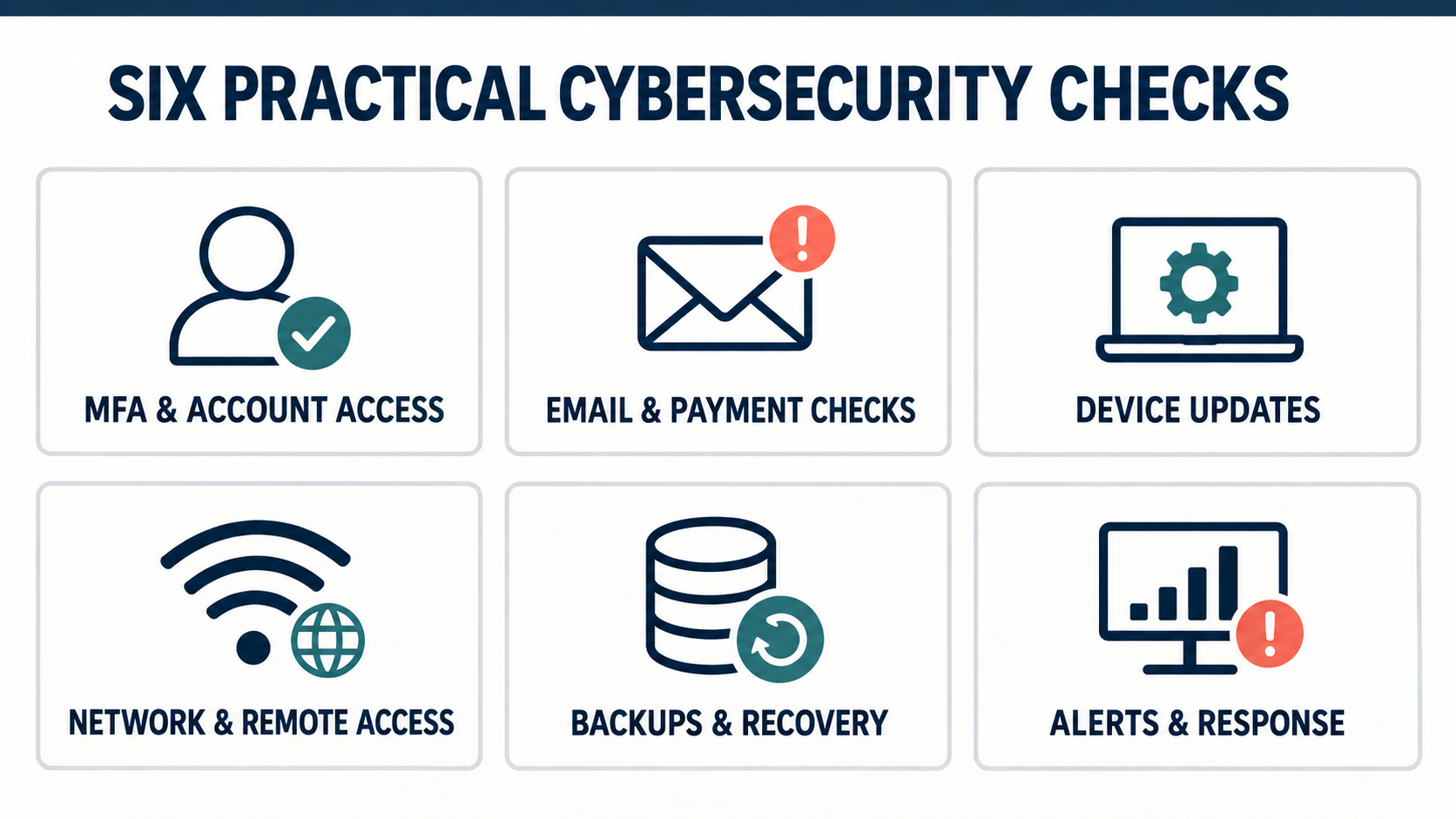
1. Is every important account protected with multi-factor sign-in?
Multi-factor authentication (MFA) means a password alone is not enough. Staff also confirm their sign-in on their phone. It stops most account takeovers, even when a password has been stolen.
Start with: email, Microsoft 365, banking, the ERP and every administrator account. Remove accounts for people who have left.
2. Can your email and payment process spot a fake invoice?
Fake invoice and payment scams cost businesses real money, and the money is rarely recovered. The email often looks perfect, because it may come from a supplier’s real account that has been hacked.
Start with: a simple rule that any change to bank details is confirmed by phone before money is sent. Add email filtering that checks links and attachments, and teach staff how to report a suspicious email.
3. Are laptops and phones updated and protected?
Most attacks use weaknesses that already have a fix. An unpatched laptop is an easy way in.
Start with: automatic updates, endpoint protection that can detect and stop threats (often called EDR), and the ability to lock or wipe a lost or stolen device.
4. Is your network and remote access limited to what people need?
In many offices, computers, servers, Wi-Fi, printers and cameras all share one flat network. If one device is infected, the attacker can reach everything. Remote access that is open to the whole internet with just a password is another common gap.
Start with: an up-to-date firewall, separate network zones (for example, guests and cameras kept away from business systems) and zero trust remote access (ZTNA) so staff reach only the apps they need.
5. Can you get your data and systems back?
Backups are part of cybersecurity. If ransomware locks your files, a clean backup is what lets you recover without paying.
Start with: backing up your most important systems, keeping a copy that attackers cannot reach, and actually testing a restore. Our guide to keeping your business working when the main connection fails covers the connectivity side of recovery.
6. Is someone watching for warning signs, day and night?
Security tools create alerts, but alerts only help if someone reads them and acts. Attacks often start at night or on weekends, when nobody is looking. In the IRC and Bank of PNG cases, how quickly the problem was found and contained made a big difference.
Start with: deciding who receives security alerts and what happens next. If you do not have staff to watch alerts 24/7, this is where a managed cybersecurity service helps most.
Real example: closing the gaps in one week
In early 2026, Hornibrook NGI, a construction business in Lae, noticed suspicious activity on its network. We found several gaps from the checklist above: an old firewall, a flat network and remote access protected by a password alone. Working side by side with their IT team, we fixed them in seven days and switched on 24/7 monitoring. There have been no security incidents in the six months since.
What is managed cybersecurity, and does your business need it?
Managed cybersecurity means an outside team looks after your security for you. Instead of buying tools and hoping someone has time to check them, a specialist team sets up the protection, keeps it updated, watches for threats 24/7 and responds when something goes wrong.
| Doing it all in-house | Managed cybersecurity | |
|---|---|---|
| Who watches alerts | Your IT staff, during business hours | A security team, 24/7 |
| Skills needed | You hire and train security specialists | Specialists are included |
| Updates and patches | Done when staff have time | Done on a schedule |
| When something goes wrong | Staff work it out under pressure | A tested response plan is already in place |
| Best for | Large businesses with a full security team | Most PNG businesses with small or busy IT teams |
For many companies, a managed service is the most practical form of cybersecurity for PNG businesses. It usually makes sense if you rely on email and cloud systems every day, handle payments or customer data, have staff across several sites, or simply do not have someone to watch for threats at night.
Sprint Networks provides managed cybersecurity services for PNG businesses, covering email and collaboration security, endpoint protection, network security, 24/7 monitoring, incident response and staff training. For businesses that want one secure network across all sites and remote staff, we also offer SASE and Secure ERP Access.
We work with your IT team, not instead of them
Bringing in a managed cybersecurity partner does not mean replacing your IT staff. Your team knows your business, your systems and your people better than anyone. Sprint Networks works alongside them. We take on the specialist, around-the-clock security work, such as watching alerts at night, keeping firewalls and security tools updated and responding to threats, so your IT team can focus on supporting staff and keeping the business running.
- Your IT team stays in control. They are kept informed and involved in every decision.
- Skills grow on both sides. We share what we see, so your team learns as we go.
- 24/7 cover without a night shift. Your team gets support out of hours without hiring more staff.
PNG cyber laws and where to report an attack
Businesses in PNG should know the basics:
- The Cybercrime Code Act 2016 makes hacking, online fraud and related offences crimes in PNG.
- The National Cyber Security Policy 2021 sets out the government’s plan to improve cybersecurity across the country.
- PNGCERT, PNG’s Computer Emergency Response Team under NICTA, coordinates responses to cyber incidents. You can report an incident through its website or by calling +675 303 3200 (Monday to Friday, 8am to 5pm).
The NIST Cybersecurity Framework is also a useful, free guide for planning your security in simple stages: identify, protect, detect, respond and recover.
Think you have been hacked? Do this first
- Disconnect the affected computer from the network, but do not turn it off.
- Do not pay any ransom or any payment request you cannot confirm.
- Change passwords for affected accounts from a different, clean device.
- Call your bank straight away if money was sent to a new account.
- Report it to PNGCERT, and call your IT or security partner.
How Sprint Networks delivers cybersecurity for PNG businesses
Sprint Networks has an office in Port Moresby and supports businesses across PNG, Fiji, the Solomon Islands and the Pacific. We design security for Pacific conditions: mixed internet links, remote sites and small IT teams. Every solution is tested in real Pacific conditions before it reaches a client’s network.
Our approach is simple:
- Assess. Work with your IT team to find the gaps that matter most to your business.
- Harden. Fix them quickly, with as little disruption as possible.
- Monitor. Watch your network and accounts 24/7.
- Respond. Act fast when something looks wrong.
Not sure where to start? Book a free cybersecurity check and a senior engineer will show you where your gaps are and how to close them. You can also contact Sprint Networks or browse our client case studies.
Frequently asked questions
What does cybersecurity for PNG businesses involve?
It is the people, processes and technology that protect your email, accounts, devices, network and data from fraud, hacking, ransomware and data loss, so the business keeps running.
Do small and medium PNG businesses really need cybersecurity?
Yes. If you use email, online banking, cloud software or store customer data, you have something worth protecting. Most attacks are automated and target any business with a weak spot, not just large ones.
What is managed cybersecurity?
It is when a specialist team looks after your security for you: setting up protection, keeping it updated, watching for threats 24/7 and responding to incidents. It suits businesses that do not have their own full-time security team.
What is the most common cyber threat for PNG businesses?
Phishing and fake invoice scams are among the most common, because they target people rather than technology. Multi-factor sign-in, email filtering and confirming bank changes by phone stop most of them.
Is there a cybercrime law in PNG?
Yes. The Cybercrime Code Act 2016 makes hacking, online fraud and related offences crimes in PNG. Cyber incidents can be reported to PNGCERT.
What should I do if my business is hacked?
Disconnect the affected device from the network, do not pay any ransom, change passwords from a clean device, call your bank if money was sent, and report it to PNGCERT and your IT or security partner.
Will a managed cybersecurity service replace our IT team?
No. Sprint Networks works alongside your IT team, not instead of them. We handle the specialist and 24/7 security work, and your team stays in control of your systems and day-to-day IT support.
How long does it take to improve a business’s cybersecurity?
The biggest gaps can often be closed quickly. In one recent project in Lae, the most urgent issues were fixed and 24/7 monitoring was switched on within seven days.
Who provides managed cybersecurity services in PNG?
Sprint Networks provides managed cybersecurity for PNG businesses from its Port Moresby office, including email and endpoint protection, network security, 24/7 monitoring, incident response and staff training.